Showing posts with label software. Show all posts

How to use Microsoft Paint new 3D -- TECHNOLOGY HANDLER

Create 3D scenes using pre-made models and your own creations


How to use Microsoft Paint 3D

If you’ve ever wanted to experiment with 3D but found most modelling tools too complicated, the new Paint 3D app in Windows 10 could be just what you’re looking for.
The replacement for the good old Paint program is meant to be easy to use for sketching in 2D, modelling 3D objects and bringing the two together in a 3D scene. You’ll be able to turn photos into 3D models, add colours and textures to models you make from 3D, and make a 3D model you can share with your friends, view on HoloLens or print out on a 3D printer. Remember, it’s still a preview, so not all the features are ready yet and you’ll need to be a Windows Insider to try it.
Don't have the software yet? Learn how to install Microsoft Paint 3D.

Microsoft Paint 3D comes with a set of videos and tips to help you get started, but the Remix option is the best way to learn the ropes

1. Get started with Paint 3D

The first time you open Microsoft Paint 3D you have to accept the Terms and Conditions. You'll then see this set of tips and tutorials to help you get started. You can watch some video tutorials to show you how to work with Paint 3D or jump straight in to making your own projects, but the easiest way to start is to join the Remix 3D site and try out the regular projects, like this one to create an autumn landscape. Don’t worry if you click past the tips and want to open them again; just close Paint 3D and reopen it. 

The Remix 3D community lets you share 3D models with other users and download new ones

2. Join the Remix 3D community

Looking for ideas? click the Remix 3D icon on the far right of the toolbar (it looks like a group of people). Not only will that let you share your 3D creations with other people; you can also look at what others in the Remix 3D community have created, and download 3D models you can use in your own images. You can even export 3D creations from Minecraft into Remix 3D. It’s a great way to get inspiration and building blocks to help you get started. Use boards to keep track of models you like, or browse Remix 3D online.

Microsoft Paint 3D supports 3D models created in other programs, and you can create your own from two-dimensional doodles

3. Grab a model and start editing

Your scenes can be a mix of 2D images and 3D shapes. To get 3D models, you can draw 3D shapes freehand with the Doodle tool, drag and drop the built-in 3D shapes, import FBX and OBJ format models from other 3D software or 3MF and STL files designed for 3D printers – or you can use 3D models from Remix 3D.
Here we’ve opened a 3D model of a tree and an acorn from Remix 3D. Select a model and you can resize it or copy and paste to use it several times; or you can use the controls to tilt, swivel and arrange your objects behind or in front of each other. The animated tip on the left shows you what you can do.

You can turn your doodles into cutouts that can be positioned within a scene, or turn them into stickers that can wrap around a 3D object

4. Turn 2D drawings into 3D models

As well as using 2D pictures (such as photos) as the background or for textures, you can also turn 2D drawings into 3D models. We drew these flowers with the different brushes, then selected them individually and clicked the Make 3D button. It's like cutting out a paper drawing; the drawing still flat but you can tilt it in space or put it behind other objects. If you want to make your 2D drawing fully three-dimensional, click Make 3D, then click the Make Sticker button. You’ll be able to stick the drawing onto 3D models and it will wrap around the contours, just like a sticker on a real object.

With Microsoft Paint 3D, you can paint straight onto 3D models with a variety of brushes and textures

5. Paint models and add backgrounds

You can paint directly onto 3D models using the different brushes; we’ve used that to make the tree more colourful. Remember, you’re painting on the 3D surface, so you might want to rotate the model to paint the side and then turn it back. Experiment with the different brushes, and different finishes: matte, glossy, dull and polished metals. If you don’t like the way any of them come out, use the Undo tool or the Time Machine slider (click the icon that looks like a clock). To insert a photo as a backdrop, just copy it in Explorer and click Paste.

You can import photos and apply them to 3D models as textures in Microsoft Paint 3D

6. Use a photo as a texture on a model

To give the acorn a face, we used the sticker feature in Paint 3D. Choose the eye and mouth stickers, then drag them onto the model and they'll mold to the shape of the surface. You can resize stickers and change the angle when you apply them, but you can’t select them later to make changes; you have to use Undo to go back and try again.
We drew the dog using the built-in shape tools in Paint 3D; there are lots of basic shapes and figures to choose from. Instead of a sticker, we used a texture to colour the dog. You can choose from the standard textures or click Add my Own on the Custom pane to use a photo.

Paint 3D's Doodle tool lets you transform your drawings into three-dimensional models

7. Draw 3D shapes freehand

There are six 3D shapes you can use to make your own models: square, sphere, cylinder, capsule, cone and doughnut. If you need a 3D shape that’s not on that list, you can draw it yourself with the 3D Doodle tools. The soft edge Doodle tool puffs up the shape you draw, like blowing up a balloon. We've used it to draw a cloud.
The sharp edge Doodle tool doesn’t distort the shape you draw as much; it just extrudes it, and you can pull the (flat) sides in and out to change how wide the model is.

Saving your work as a project menas you'll be able to return to it and continue editing later

8. Save your creation

Once you have all your objects in the scene, you can arrange them in 3D space. Select a 3D object and click the tool on the left of the bounding box that lets you drag the object backwards and forwards on the stage – behind or in front of the other objects or even inside them. You can also add 2D and 3D text to the scene if you want to include a message. Use the effects to choose a tint to the lighting.
Once you're happy with the results, use Save, Export or Publish to Remix 3D if you’re completely finished. If you want to come back and keep working, make sure you choose Save Project or you won’t be able to edit anything later.

The best free photo editor 2016

Whatever your level of expertise, there's a free photo editor that will give you all the tools you need to make your pictures look amazing. These are our three favorite free tools for optimizing your images.

1. GIMP


The most fully-featured free photo editor around, GIMP is powerful enough for just about any task.

2. Paint.NET


Not quite as feature-packed as GIMP, but Paint.NET's streamlined interface makes everyday photo editing a breeze.

3. PhotoScape


PhotoScape appears simple , but delve a little deeper and you'll find RAW conversion, photo splitting and merging, and animated GIF creation.
                                                                       SOURCE: techradar

Pokemon Go: Does anyone even care anymore?-- TECHNOLOGY HANDLER


Months after Pokemon Go was launched in U.S.A, Niantic finally launched the game in India through a tie-up with Reliance Jio a few days ago. The biggest problem with this move is that no one really cares anymore.

Those who were excited by the game and enamored by it’s A.R. capabilities downloaded the game months ago when it was actually released. Niantic completely missed the boat on the smartphone game’s launch in India.

From a phenomenon to a has-been
When Pokemon Go first launched, it became a phenomenon almost overnight, breaking records left right and center and even crossing behemoths like Facebook and Twitter in terms of active users.

Pokemon Go completely captured the imagination of the public in a way we haven’t really seen before. Seeing people randomly walking on the streets trying to desperately catch the elusive 'Pikachu' became a common sight, even in India.

However, it all died out incredibly fast. While it might be a little presumptuous to say, the truth of the matter is that no one really cares about Pokemon Go anymore. Just like a pop song, which becomes the rage for a few weeks and then completely vanishes from the charts, Pokemon Go has become just a side note in history.

According to a report from app tracking firm Slice, Pokemon Go had lost a whopping 80% of its paying players since its highest point in mid-July. This was in the second week of September. The situation will be worse by now.

Just a fad?
Pokemon Go seems to be suffering from the same fatigue experienced by various fads such as Angry Birds or Flappy Bird: people going crazy over the game and then slowly losing interest.

Niantic hasn't helped its cause by removing features like the nearby system which caused a lot of fan backlash, and the general buginess of the game hasn't found any favors with players.

What does Niantic need to do to revive interest?
The big question here is how will Pokemon Go fare in the coming months. Niantic is at a crucial juncture in the game's lifecycle, where the initial hoopla is dying down and people are starting to lose interest.

Niantic needs to keep users engaged with frequent updates and new features and make sure they reinvent themselves as time goes by. The plethora of bugs and issues in Pokemon Go need to be ironed out and the game needs to start feeling like a finished product.

Is this the beginning of the end?
Pokemon Go is a glimpse into the practical and real world application of A.R. and it will be sad to see it suffer the same fate as that of Angry Birds or Gangnam Style. What do you think? Are you excited for Pokemon Go’s launch in India? Do you think it can reclaim the magic? 
                                                                     source: techradar

6 Best Free SEO Tools for Startups -- TECHNOLOGY HANDLER

You can use these tools for enhancing your strategies until you garner enough revenue to move on to bigger and better tools. Here is a list of the best free tools for SEO startups…
Moz
Moz has a whole suite of SEO tools that you can try . These tools include keyword tracking, ranking monitoring, on-page optimizations, and link tracking, just to name a few.The users can manage and update business listings across the web with a single platform.
 MergeWords
Merge words is fast and easy to use for domain registrations, Google Adwords, whatever. Use MergeWords to research keywords for rankings and domains, and queries for link building. It’s an efficient tool for organizing all search information into data that you can use to plan your strategies.
 Buffer
With the use of Buffer software, scheduling all of your social media content interactions is simple. It has a comprehensive content builder that enables filling in SEO-optimized content and setting up a publishing time frame to keep your campaign on track. It’s one of the best tools for staying ahead of the social game.
 Google Tools
Google has an arsenal of tools that you should at least check out when it comes to search engine optimization. Google Webmaster Tools, Google Analytics, Google Adwords Keyword Planner, Google Trends, PageSpeed Insights, and more can all be utilized to test the success of all SEO-related content and strategies. The best part is, most of these tools are entirely free for the basic versions.
 Screaming Frog
This free tool is legendary for its ability to “spider crawl” through websites, links, images, code, and apps in order to collect useful data for maintaining your website.  You’ll be able to fix many of the errors that would otherwise hurt your rankings, such as image errors, incomplete meta tags, or copied content. Screaming Frog is also very useful for spying on competition and receiving reports on inbound and outbound links.
 SimilarWeb
It is an excellent tool for gathering insightful data about your websites, customers, or even competitors. It can also be used to define a target audience, pick up on branding cues, report on traffic sources, and track other helpful metrics. Though there are other free tools that do the same thing, this apparatus is particularly useful because it delivers all the information in easy-to-read graphs, which simplifies the process.
                                                                    source: pcquest

Instagram launches disappearing Live video and messages

Instagram launches disappearing Live video and messages

Instagram is combining the best of Snapchat and Periscope to help you get comfortable on camera. Rather than overlap with Facebook Live and Messenger, Instagram is putting an ephemeral spin on video streaming and private messaging.
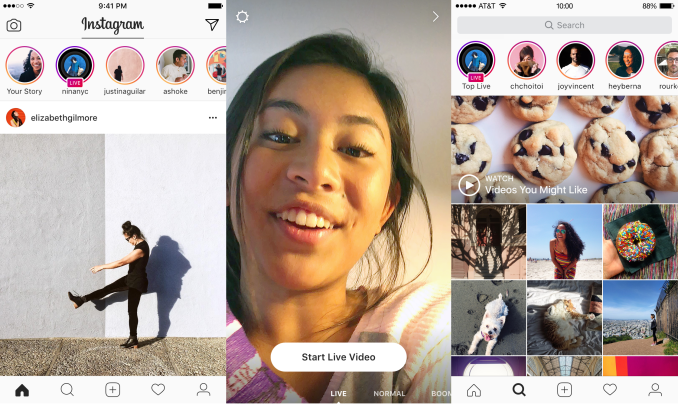
Today, two big new features begin rolling out to Instagram Stories on iOS and Android over the next few weeks. Instagram Live lets you broadcast video to your followers in real-time, but they can only watch while you’re still streaming. No replays. But you will be able to browse an algorithmically curated Explore page of the best Instagram Live videos happening right now.
And if you don’t feel like sharing a doodle and text-covered Instagram Stories post to all your followers, you’ll be able to send it as a ephemeral Direct message to just a few of your closest friends. But they can only watch it twice before it disappears.
“We pivoted” Instagram’s head of product Kevin Weil tells me. “Instagram should be all of your moments, not just your highlights.” Since the new Live and Direct content self-destructs, Instagram hopes users will be less concerned about how they look or if they’re doing something cool. The features sway the balance of who Instagram is for further towards users rather than public figures and polished social media celebrities — a balance other apps get wrong.

Instagram Live

Instagram Live is the most ephemeral of the major Live streaming platforms now that Meerkat is defunct.
While Periscope started with a 24 hour expiration date, it eventually allowed permanent replays like Facebook Live. Instagram Live videos disappear as soon as the stream stops, which could get people broadcasting more frequently rather than saving the capability just for big flashy events or citizen journalism. Meanwhile, viewers will feel greater urgency to watch immediately because they know it’s their only chance.
Product manager Shilpa Sarkar tells me her company was “interested in people going live to hang out with friends.”, which is becoming popular in Live group video chat app Houseparty. Instagram was spotted testing Live in Russia by T Journal last month, and last week told The Verge it would build a Live product.
ig-live
See friends who are Live atop your feed, start your own broadcast, or discover the top Live streams in Explore
To go Live, you’ll swipe from the Instagram Stories camera. Instagram will choose some close friends who’ve shown interest in Live video to hit with notifications to come watch, as well as showing a Live tag on your Instagram Stories bubble that appears at the top of the feeds of your followers. Not alerting everyone who follows you prevents notification overload that plagued Periscope early on.
Viewers can comment, or tap repeatedly to add hearts exactly like on Periscope but with their face in some of the hearts. Broadcasters can add comments too, and helpfully pin one of theirs or a viewer’s to the top of the reel. For a more peaceful, FaceTimey experience, streamers can hide comments or all the buttons, and they can block or report anyone who harasses them.
Since none of your friends might be Live at any given moment, Instagram’s Explore tab Stories section will highlight the best Live streams happening now. Based on view count, geography, and language, Instagram will provide a curated channel you can swipe through, creating the most laid-back Live discovery and consumption experience around.

Instagram Direct Ephemeral

Instagram Direct already has 300 million monthly users, but all of the messages are permanent. The existing product lets you send text, photos, and videos, and posts from Instagram to friends and discuss them. But with Instagram Stories now letting you communicate visually with overlaid text and drawing, Instagram needed a way to share these ‘Gramsterpieces privately.
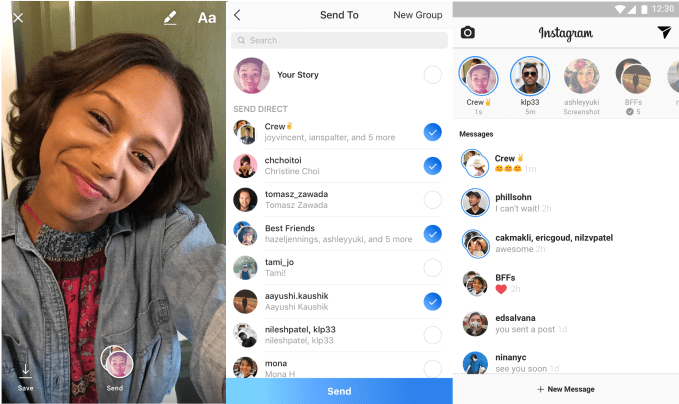
Now Direct will have an ephemeral Stories messages bar at the top along with a list of permanent threads below. When you go to share a photo or video to Instagram Stories, you’ll be able to also select friends or groups of friends to send it to. It’s much like how you can send Snapchat Stories as private messages, but adds in a groups feature.
instagram-direct-ephemeral
Shoot something in Instagram Stories, pick friends to Direct message it to, and they can watch before the content disappears
Recipients can watch the messages once, and replay them once, but then they’re gone. This way if you want to make a racy joke or share something vulnerable not fit for your public Story or all your friends, you can send it Direct and be sure it will disappear. If lots of friends contribute to one of these group “camera conversations”, the thread becomes sort of a collaborative Story slideshow you can tap through, reminiscent of the cooperative video app Riff that Facebook tried building.
The dual Direct inbox is certainly a bit complicated, but both ephemeral and permanent messaging makes sense in Instagram so it needed a way to collect both. A third option could be coming. When I asked if Instagram would ever let you Direct Live stream privately to a group of friends, the company said that makes sense and it’s thinking about how to do it. However, Instagram needs to be careful that it doesn’t become confusing with so many features.
What’s special about Instagram’s ephemeral Live and Direct updates is that they give creators total control over their audience. You see if someone starts watching your Live stream, and they can’t watch it later, while you select exactly who receives your Directs. That means no one can snoop on this content without you knowing immediately, something not even Snapchat offers for public accounts.
Typically, every piece of social media we create comes with the sneaking suspicion that a co-worker or family member might see it. That forces creativity to bend to the lowest common moral and intimacy denominator. Everything has to be inoffensive and guarded enough for everybody. But that extinguishes the true potential of Instagram unlocked by these features: the freedom to be yourself by choosing who you be yourself around.
                                                      source: tech crunch

7 Essential Tools for the Lean Web Developer - TECHNOLOGY HANDLER


Here is a list of some open source tools for the lean web developer
Evernote
Evernote is a cross-platform, free app designed for note taking, organizing, and archiving.  The app allows users to create a “note” which can be a piece of formatted text, a full webpage or webpage excerpt, a photograph, a voice memo, or a handwritten “ink” note. Notes can also have file attachments. Notebooks can be added to a stack while notes can be sorted into a notebook, tagged, annotated, edited, given comments, searched, and exported as part of a notebook.
Download: http://download.cnet.com/Evernote/3000-2381_4-10425994.html
Dropbox
Dropbox is a file hosting service operated by American company Dropbox,  that offers cloud storage, file synchronization, personal cloud, and client software. Dropbox allows users to create a special folder on their computers, which  then synchronizes so that it appears to be the same folder (with the same contents) regardless of which device is used to view it. Files placed in this folder are also accessible via the Dropbox website and mobile apps.
DOWNLOAD: http://filehippo.com/download_dropbox/
Droplr
As a developer, working with designers or co-workers often means sharing documents, images and text. Droplr makes that incredibly easy, packaged in a blazingly fast, slick, intuitive interface. Without even signing up, we can upload files and share them with a generated URL  for a period of seven days, while signing up for a free account allows uploads of up to 25MB files and up to 1GB of storage.
DOWNLOAD: http://download.cnet.com/Droplr/3000-2196_4-75222306.html
Xampp
A live testing environment should be an essential element in every web developer’s toolbox, and XAMPP is a highly recommended open source, configurable web server. It contains Apache, MySQL, PHP, OpenSSL, FileZilla FTP server and more, bundled together for a smooth configuration.
DOWNLOAD: http://filehippo.com/download_xampp/
Git
Git is an open source revision control and source code management system that tracks the history of your project in a data structure called a repository. Git is a decentralized system that allows for multiple backup repositories.
They only merge when stabilized, making it easy to experiment quickly and safely. This is particularly useful if you’re working in collaboration with others, as you can share the history of the project, merge between their work and yours, then compare and revert to previous versions of individual project files.
DOWNLOAD: https://git-scm.com/downloads
GitHub – Gist
GitHub is a place to securely store your code, and Gist is a simple way to share snippets and pastes with others.
With native clients for Mac, Windows and mobile devices, GitHub offers the ability to work on your projects from anywhere. It’s a powerful way to collaborate, review and manage your code on both public and private development projects. Hosting your code using an external service such as GitHub means it’s safe and secure, should your web host get hacked or your computer crashes, for example.
DOWNLOAD: http://github-for-windows.en.softonic.com/
JS Bin
JS Bin supports remote rendering, enabling you to check on multiple platforms while the output automatically refreshes as you edit the code. Once you start typing, JS Bin saves your work .If you want to stop saving, just create a milestone and live saving will apply to the new revision.
DOWNLOAD: http://webscripts.softpedia.com/script/Development-Scripts-js/Complete-applications/JS-Bin-80868.html

Internet-connected devices will always pose a risk, experts say


Hacked cameras, DVRs and other devices in the internet of things are making headlines. But improvements are possible, say cybersecurity experts.
The internet of things isn't secure.
That much was clear when a panel of four cybersecurity experts began their talk on Thursday at the Techonomy conference in Half Moon Bay, California.
That risk became a real threat last month, when hacked cameras and DVRS began overwhelming popular websites with requests and knocking them offline, causing internet outages across the US."The internet of things is something that cannot be fully secured," said Betsy Cooper, the executive director of the UC Berkeley Center for Long-Term Cybersecurity. "We just have to assume that there is a risk."
In light of that and other recent attacks, "We should absolutely be working to get that risk as low as possible," Cooper said.
Experts have lots of ideas for making things better, from creating security standards for internet-connected devices to raising awareness of the risk among the public. Cooper was joined by Verizon executive Mark Bartolomeo; Nicole Eagan, CEO of cybersecurity firm Darktrace; and Chris Rill, an executive at IoT security company Canary.
"It's a problem we'll probably never stop working on," Bartolomeo said.
One solution that's already in the works is a security rating for internet-connected devices. Companies like ICSA Labs and Underwriter Laboratories (better known as UL) are testing and developing standards for devices. So is the National Institute for Standards and Technology, which is part of the US Department of Commerce. These efforts could lead to a consumer rating system akin to the crash test rating for a car or an energy rating for a refrigerator.
All this testing could help a problem that is difficult for companies to avoid, Eagan said. Companies that sell IoT devices often have them manufactured by a string of third parties outside the US. That means companies can't be totally sure the device they designed is secure.
"An attack can be embedded in the device before it arrives," Eagan said.
Despite the testing efforts, Rill said the problems built into today's IoT devices won't be fixed for another two to three years.
"It's going to get worse before it gets better," Rill said. "I would say ask a lot of questions before you buy these products."
                                                    source : cnet.com/news
Amazon Best Reads